Every time you browse the web, join an online multiplayer match, stream a 4K video, or download a file, your packets navigate a silent networking mechanism known as Network Address Translation (NAT). Without NAT, the global IPv4 internet would have collapsed decades ago under the sheer weight of connected devices.
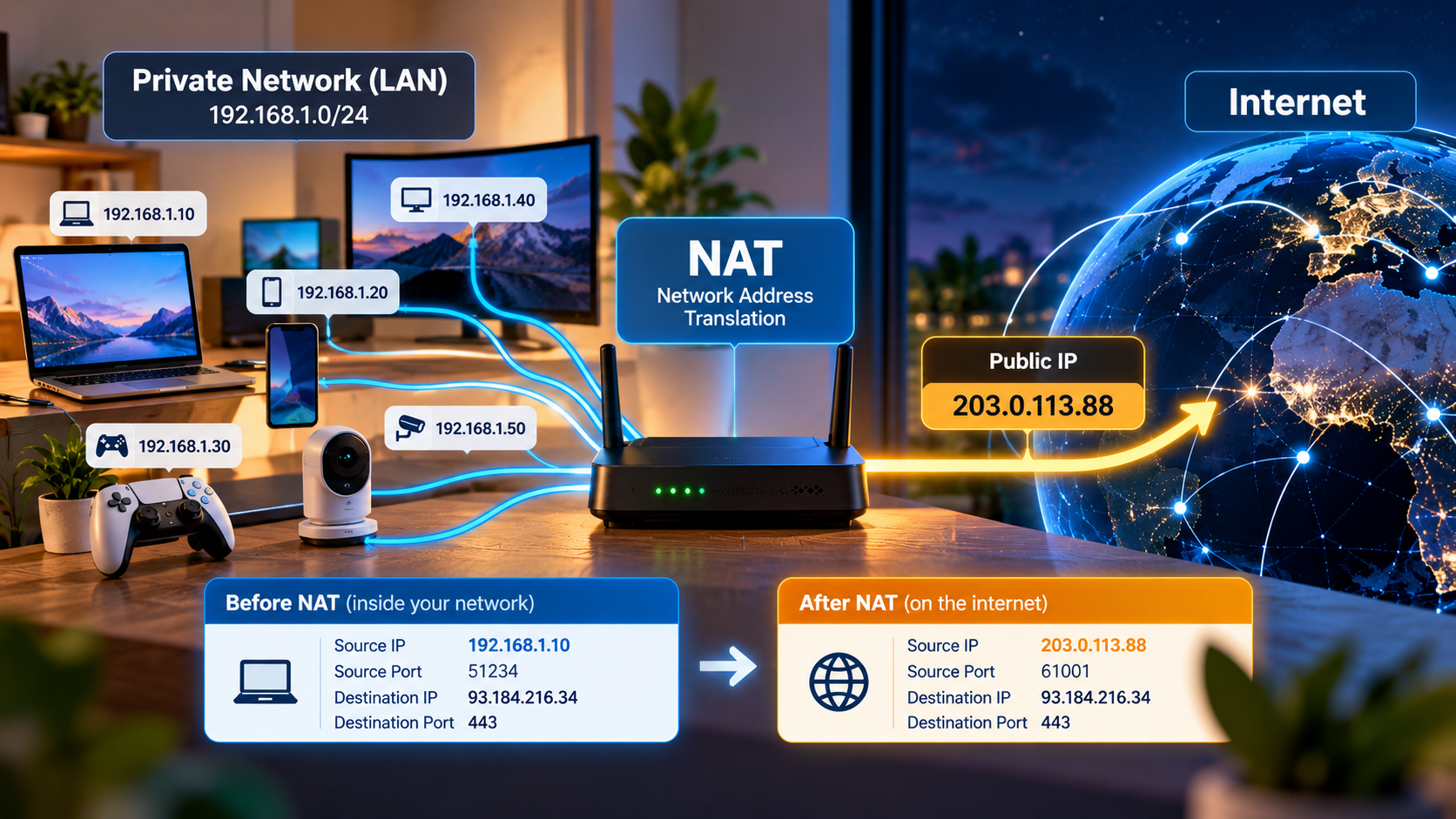
In standard home and office networks, your router manages dozens of laptops, phones, smart TVs, and IoT sensors. Yet when those devices communicate with remote servers, the outside world sees only a single public IP address. NAT is the invisible translation engine that makes this possible.
However, NAT is also the primary culprit behind frustrating connectivity headaches: failed peer-to-peer gaming lobbies, inaccessible self-hosted home labs, broken voice chat, and "Port Closed" warnings on port checker tools. In this guide, we dive deep into how NAT works, dissect the four RFC-defined NAT types, examine gaming NAT profiles (Open, Moderate, Strict), and provide clear troubleshooting workflows.
🔍 Quick Check: What IP Does the World See?
Discover your current external public IP address, ISP details, and geographic location in real time before diving into network translation:
Check Your Public IP Now →1. Why Was NAT Invented? The IPv4 Exhaustion Problem
When the Internet Protocol version 4 (IPv4) was formalized in RFC 791 back in 1981, it established a 32-bit addressing architecture. This provided a mathematical ceiling of exactly 4,294,967,296 addresses (roughly 4.3 billion).
In the early 1990s, the explosion of commercial internet adoption made it obvious that the world would quickly run out of unique public addresses. While the long-term solution was the development of IPv6 (offering a practically infinite 128-bit address space), migrating global telecommunications infrastructure takes decades.
The IETF introduced two critical interim technologies to save IPv4:
- Private IP Address Space (RFC 1918): Reserved specific IP blocks exclusively for private local area networks (LANs) that can never be routed directly across the public internet:
10.0.0.0/8(10.0.0.0 to 10.255.255.255) — 16.7 million addresses172.16.0.0/12(172.16.0.0 to 172.31.255.255) — 1.04 million addresses192.168.0.0/16(192.168.0.0 to 192.168.255.255) — 65,536 addresses
- Network Address Translation (RFC 1631 / RFC 3022): Enabled an edge gateway device (such as your home router) to translate private addresses into one or more publicly routable IPv4 addresses on the WAN interface.
Thanks to NAT, millions of households can simultaneously utilize the internal subnet 192.168.1.0/24 without causing IP collision conflicts across the global internet backbone.
2. How NAT Works: The NAT Translation Table
To understand NAT in practice, consider what occurs when a desktop computer inside your home network requests a web page from a remote server:
- Outbound Packet Generation: Your desktop (private IP
192.168.1.45) establishes a TCP connection to a web server (public IP93.184.216.34on port 443). The operating system assigns a dynamic source port, such as51234.
Packet Header:Src: 192.168.1.45:51234 → Dst: 93.184.216.34:443 - Router Translation (NAT Table Entry): The packet reaches your home router's LAN interface. The router recognizes that the destination is on the public WAN. It rewrites the source IP with its own public WAN IP (e.g.,
203.0.113.88) and assigns an available WAN source port (e.g.,61001). It logs this mapping into its internal NAT Translation Table:192.168.1.45:51234 ↔ 203.0.113.88:61001 ↔ 93.184.216.34:443 - Packet Forwarding: The modified packet travels across the internet:
Modified Header:Src: 203.0.113.88:61001 → Dst: 93.184.216.34:443 - Inbound Response: The web server receives the packet and replies back to the sender it knows:
203.0.113.88:61001. - Reverse Translation: When the response packet reaches the router, the router queries its NAT table for destination port
61001. Finding the matching state, it replaces the destination IP and port with192.168.1.45:51234and forwards the packet onto the LAN.
This entire translation cycle occurs in microseconds. As long as internal devices initiate outbound traffic, the router dynamically creates state entries, allowing two-way communication.
3. The Technical Flavors: Static NAT, Dynamic NAT, and PAT
In enterprise networking (such as Cisco, Juniper, and Linux routing), network administrators classify NAT into three core architectural flavors:
| NAT Flavor | Mapping Type | Port Tracking | Typical Use Case |
|---|---|---|---|
| Static NAT | One-to-One (1:1) | Ports unmodified | Exposing internal enterprise web/mail servers on dedicated public IPs. |
| Dynamic NAT | Many-to-Many pool | Ports unmodified | Corporate networks mapping internal clients to a pool of bought public IPs on demand. |
| PAT (NAT Overload) | Many-to-One (M:1) | Unique source ports | Standard home broadband routers, Wi-Fi hotspots, and cellular tethering. |
Port Address Translation (PAT), often termed NAT Overload, is the exact technology used in 99% of consumer routers. Because a TCP/UDP port number is a 16-bit integer, a single public IPv4 address can theoretically support over 64,000 concurrent translated sessions.
4. The 4 Classic NAT Types (RFC 3489 / RFC 4787)
In peer-to-peer (P2P) networking, VoIP (SIP), WebRTC communication, and online gaming, routers behave very differently depending on how strictly they filter unsolicited inbound connections. RFC 3489 classifies NAT implementations into four distinct categories:
Type 1: Full-Cone NAT (One-to-One NAT)
In a Full-Cone NAT, once an internal device (IP_A:Port_A) sends a packet through an external mapped port (WAN_IP:Port_B), any external host on the internet can send packets to WAN_IP:Port_B, and the router will faithfully forward them to IP_A:Port_A.
Characteristics: Extremely lenient. Ideal for P2P networking and hosting game servers, but rare in modern consumer routers due to minimal inbound protection.
Type 2: Restricted-Cone NAT (Address-Restricted Cone)
In Restricted-Cone NAT, external host Host_X can send inbound packets to WAN_IP:Port_B only if the internal device previously transmitted a packet to Host_X's IP address. The port from which Host_X replies does not matter, but the IP must match.
Characteristics: Offers a healthy balance of security and usability. Packets from arbitrary uncontacted third parties are rejected.
Type 3: Port-Restricted Cone NAT
Port-Restricted Cone NAT increases filtering rigor: external host Host_X:Port_Y can send packets to WAN_IP:Port_B only if the internal client previously sent a packet directly to both that specific IP address and that exact port.
Characteristics: Very common in modern consumer firmware and commercial routers. Highly secure, but requires protocol traversal techniques (like STUN) for peer-to-peer gaming lobbies.
Type 4: Symmetric NAT
Symmetric NAT is the strictest and most restrictive implementation. Unlike cone NATs, which reuse the same external port for all outgoing connections from a given internal socket, Symmetric NAT assigns a unique external port for every distinct destination endpoint (destination IP and destination port combination).
Characteristics: External entities cannot predict or punch through the NAT mapping because each destination sees a completely different port. Symmetric NAT breaks standard STUN hole punching and causes notorious "Strict NAT" issues in multiplayer games and SIP VoIP calls. Enterprise firewalls and 4G/5G mobile carriers frequently enforce Symmetric NAT.
5. Gaming NAT Types: Open (Type 1), Moderate (Type 2), Strict (Type 3)
Console platforms (PlayStation 5, Xbox Series X/S, Nintendo Switch) and PC gaming ecosystems translate the RFC network definitions into three gamer-friendly tiers:
| Gaming NAT Type | Underlying RFC NAT Behavior | Can Connect With | Hosting & Voice Chat |
|---|---|---|---|
| Open (Type 1) | Full-Cone NAT or direct public IP connection | Open, Moderate, and Strict players | Flawless; can host lobbies, party chats, and dedicated sessions. |
| Moderate (Type 2) | Restricted-Cone or Port-Restricted Cone NAT | Open and Moderate players only | Works well for general matchmaking; cannot host players with Strict NAT. |
| Strict (Type 3) | Symmetric NAT, Double NAT, or blocked UPnP | Open players only | High matchmaking queue times; frequent voice party drops; cannot host matches. |
6. Is NAT a Security Feature? Debunking the Myth
A persistent misconception in IT and cybersecurity discussions is treating NAT as a security firewall. While NAT does provide an incidental layer of obfuscation—since devices on the internet cannot address 192.168.1.15 directly without an established translation entry—NAT is not security.
- No Deep Packet Inspection: NAT does not analyze whether incoming packets contain malware payloads, exploit shellcode, or malicious scripts.
- Outbound Blindness: If an infected workstation on your LAN initiates a reverse shell or contacts a botnet C2 server, NAT gladly translates the packet and allows communication out.
- Internal Lateral Movement: NAT does nothing to protect devices from compromised machines inside the same local subnet.
Furthermore, NAT does not encrypt your web payloads, mask your browsing destination from your internet service provider, or protect your traffic across public Wi-Fi networks.
🛡️ Beyond NAT: Shielding Your Complete Data Stream
While NAT translates network addresses, it provides zero cryptographic security for your outbound data. To prevent ISPs, Wi-Fi eavesdroppers, and advertising trackers from monitoring your traffic, explore our comprehensive VPN architectural review:
Why Use a VPN: Network Privacy Guide →7. Common NAT Problems and How to Fix Them
1. The "Double NAT" Headache
Double NAT occurs when your network data passes through two separate routers performing NAT before reaching the public internet. This frequently happens when users plug a third-party Wi-Fi router (like Asus, Netgear, or Eero) into an ISP modem/gateway that is also functioning as a router.
Symptoms: Gaming consoles report Strict NAT, port forwarding fails to reach internal servers, and VPN connections intermittently drop.
The Fix: Log into your ISP modem/router and switch it into Bridge Mode (or IP Passthrough). This disables NAT on the ISP modem, allowing your main Wi-Fi router to receive the public IP address directly.
2. Carrier-Grade NAT (CGNAT / Large-Scale NAT)
In modern broadband, cellular 5G networks, and fiber deployments, internet providers frequently implement Carrier-Grade NAT (CGNAT). Under CGNAT, your ISP assigns you an address from the shared 100.64.0.0/10 block (RFC 6598) rather than a genuine public IP.
Because you cannot configure port forwarding on the ISP's carrier-level gateway, standard router port forwarding will not work. Learn how to verify whether your connection is subject to upstream provider translation in our practical guide on How to Detect CGNAT.
3. Closed Ports on External Checks
When you attempt to host a Minecraft server, Plex media library, or WireGuard tunnel, testing the port with an online tool may show it as closed. If NAT or firewall rules are misconfigured, external packets are silently dropped.
⚡ Test Your Forwarded Ports Remotely
Verify whether your router NAT rules and local firewall allow inbound connections from the public internet:
Run Online Port Checker →8. How NAT Traversal Works: STUN, TURN, and UPnP
Because NAT inherently restricts unsolicited inbound packets, modern communication protocols rely on standardized NAT traversal mechanisms to establish peer-to-peer sessions:
- UPnP (Universal Plug and Play): Allows software on your device (such as a gaming console or BitTorrent client) to programmatically ask your router to open and forward a specific port on demand, without manual router configuration. While convenient, UPnP introduces security risks if malware exploits it. Read more in our guide on What Is UPnP and Its Security Risks.
- STUN (Session Traversal Utilities for NAT - RFC 5389): A lightweight protocol that allows a client behind NAT to query an external STUN server to discover its public IP address and the exact type of NAT mapping being enforced. STUN enables direct peer-to-peer UDP hole punching for Full-Cone and Restricted-Cone NATs.
- TURN (Traversal Using Relays around NAT - RFC 5766): When one or both clients are behind Symmetric NAT, direct hole punching is mathematically impossible. TURN provides an intermediary relay server in the cloud that forwards audio, video, and gaming traffic between the peers, at the cost of higher server bandwidth and slight latency.
- ICE (Interactive Connectivity Establishment - RFC 5245): The framework used by WebRTC and VoIP to systematically test direct connection candidates, STUN hole punching, and fallback TURN relays to find the optimal communication path.
9. IPv6: Does NAT Exist in IPv6?
The short answer is: In pure IPv6 networking, traditional NAT is obsolete and unnecessary.
IPv6 provides \(2^{128}\) addresses—roughly 340 undecillion addresses. Every connected smartphone, smart light bulb, laptop, and server on earth can receive its own globally unique, publicly routable IPv6 address. Under IPv6:
- Routers no longer need to translate private IPs or rewrite packet headers.
- End-to-end connectivity is restored to the original architectural vision of the internet.
- Security is handled by stateful IPv6 firewalls, which inspect traffic state and block unsolicited incoming packets by default without needing NAT translation tables.
While an enterprise protocol known as NAT66 (or NPTv6) exists for network prefix translation in specialized multi-homed enterprise environments, standard consumer IPv6 deployments eliminate the complexities of NAT entirely.
Frequently Asked Questions
What is the main purpose of NAT?
The primary purpose of Network Address Translation is to conserve limited public IPv4 addresses by allowing multiple devices on a private local network to share a single public IP address when communicating over the internet.
Does NAT slow down my internet connection?
In modern consumer routers and enterprise switches, NAT processing is executed in hardware chips (ASICs) or optimized network stacks, adding less than a fraction of a millisecond of latency. It does not noticeably slow down your internet speed or bandwidth.
Can I change my NAT type from Strict to Open?
Yes. You can improve your NAT type by enabling UPnP on your router, setting up static IP assignments with dedicated port forwarding rules, placing your gaming console into the router's DMZ, or putting your ISP modem into Bridge Mode to eliminate Double NAT.
Why do my ports still show closed even after port forwarding?
A port will appear closed if no application is actively listening on that port, if your operating system firewall (such as Windows Defender) is blocking the traffic, or if your internet provider has placed your connection behind Carrier-Grade NAT (CGNAT).
What is the difference between NAT and a firewall?
NAT simply translates IP addresses and port numbers between two network interfaces. A firewall inspects network packets according to predefined security rules, filtering out unauthorized, malicious, or malformed traffic regardless of whether translation takes place.
Read Next
- CGNAT Explained: What Carrier Grade NAT Is and Why It Matters
- How to Detect CGNAT: 2-Minute Diagnostic for Your ISP
- Port Forwarding Explained: Step-by-Step Setup and Concepts
- Why Is My Port Closed? Common Causes and Troubleshooting Fixes
- What Is UPnP? How It Works and Security Vulnerabilities
- Best Open Ports for Gaming: Fix Lag and Matchmaking on PS5, Xbox & PC
- Why Use a VPN? Complete Privacy & Security Analysis
- Test Open Ports Externally with Our Free Port Checker