Introduction
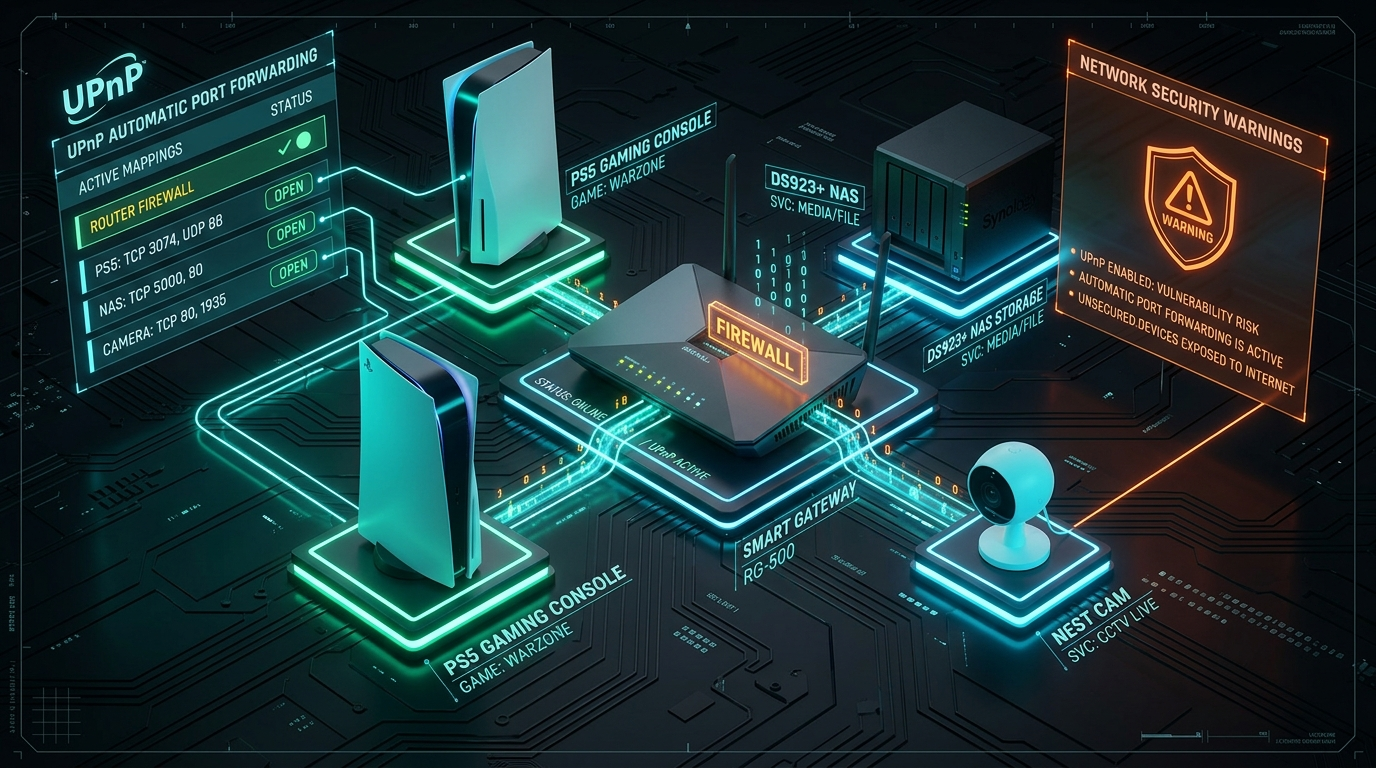
Connecting a new smart TV, gaming console, or media server to a home Wi-Fi network used to require manually opening ports on your router so devices could communicate with external servers. To eliminate this technical friction, networking manufacturers introduced UPnP (Universal Plug and Play).
UPnP is a networking protocol designed to allow local devices on your home network to automatically discover each other, announce their capabilities, and request the router to open port forwarding rules without requiring any user intervention.
While UPnP provides undeniable convenience for online gaming and smart home setups, it also introduces a severe security vulnerability: UPnP lacks authentication by default. This means any malware, compromised smart device, or unauthorized app on your network can silently command your router to open public ports to the internet.
In this guide, we break down how UPnP works, why security experts recommend disabling it, and how to safely handle port requirements without exposing your network.
⚠️ Quick Summary: Has UPnP Opened Unwanted Ports?
Because UPnP automatically opens router ports without asking for password confirmation or notifying the user, you may have open ports exposed to the public internet right now. Test your router's external exposure with our free port checker.
Test Your Router for Open Ports →How UPnP Works Under the Hood
UPnP relies on standard networking protocols (HTTP, XML, and UDP) to automate device discovery and port mapping across local networks:
1. Discovery (SSDP)
When a new device connects to your Wi-Fi network, it broadcasts a Simple Service Discovery Protocol (SSDP) message on UDP port 1900 announcing its presence (e.g., "I am a PlayStation 5 looking for network services").
2. Capability Exchange
The router and other UPnP-enabled devices respond with a URL pointing to an XML description file. This file details the device's manufacturer, model number, serial number, and supported network controls.
3. Automatic Port Mapping (IGD Protocol)
Using the Internet Gateway Device (IGD) protocol, the application sends a silent request to the router: "Please open public port 3074 and forward incoming traffic directly to my local IP address." The router automatically updates its NAT forwarding table and firewall rules without asking the administrator for permission.
Why UPnP Is Used (The Convenience Factor)
UPnP became the industry standard for consumer hardware because it seamlessly enables zero-configuration networking across several everyday use cases:
- Multiplayer Gaming: Consoles like Xbox and PlayStation use UPnP to obtain an "Open NAT" status, enabling direct peer-to-peer connections for voice chat and multiplayer matchmaking.
- Media Streaming (DLNA / Plex): Smart TVs, media players, and smartphones discover local DLNA servers or Plex media hubs automatically.
- Smart Home IoT Devices: IP security cameras, smart hubs, and voice assistants establish remote communication channels without manual router setups.
The Dark Side: Why UPnP Is a Major Security Risk
Despite its convenience, cybersecurity agencies and network engineers strongly advise turning off UPnP on home and office routers due to several critical security flaws:
1. Zero Authentication or Permission Controls
The fundamental vulnerability of UPnP is that it trusts every device on your local network implicitly. UPnP does not ask for a password, admin authorization, or user approval. If a laptop or smartphone on your Wi-Fi contracts malware via a phishing link, that malware can issue UPnP requests to open router ports, exposing internal services or establishing stealth remote access backdoors for hackers.
2. WAN-Side UPnP Exposure (Flawed Router Firmware)
UPnP was designed strictly for local area networks (LAN). However, many consumer router models ship with buggy firmware that accidentally listens for UPnP commands on the public internet (WAN) interface. Flaws like CallStranger and UPnProxy allow external attackers on the internet to send malicious UPnP requests directly to your router, turning your router into a proxy for launching cyber attacks or launching internal network probes.
3. Silent Ransomware and NAS Exploitation
Network Attached Storage (NAS) appliances often use UPnP to open external web management ports. Ransomware botnets scan for exposed NAS web panels opened via UPnP, compromise the device using default credentials or unpatched vulnerabilities, and encrypt all stored photos and documents.
📁 Safer File Sharing: Encrypted Cloud Storage
Allowing UPnP to auto-forward ports to your local storage drives creates a major target for ransomware. Using zero-knowledge client-side encrypted cloud storage keeps your files accessible anywhere without exposing local router ports.
Explore Encrypted Storage Solutions →4. Device Profiling & Digital Footprint Exposure
Because UPnP devices broadcast detailed XML descriptors containing hardware vendor names, model numbers, and firmware versions, network scrapers can index your exposed hardware. This device profiling makes it easier for bad actors to correlate your network activity with public data broker databases.
🛡️ Isolate Devices & Reduce Your Footprint
Instead of exposing your local devices via UPnP, use a privacy VPN or mesh tunnel to encrypt remote connections. Pair network isolation with data broker removal services to keep your personal records offline.
Should You Disable UPnP on Your Router?
Yes. For maximum security, you should disable UPnP on your router.
The security risks of unauthenticated port forwarding outweigh the minor convenience of automatic setup. If an application or gaming console specifically requires inbound connections, it is far safer to manually configure static port forwarding rules for that specific device IP address rather than leaving an open-door policy for all network software.
How to Disable UPnP on Your Router
Disabling UPnP takes less than two minutes on most home routers:
- Open your web browser and navigate to your router's gateway IP address (typically
192.168.1.1or192.168.0.1). - Log in using your router's administrator credentials.
- Navigate to the Advanced, NAT, WAN, or Network / Firewall Settings menu.
- Locate the UPnP (Universal Plug and Play) setting.
- Toggle UPnP to Disabled or Off and click Save / Apply.
- Reboot your router to flush any existing active UPnP port mappings.
Frequently Asked Questions
Will disabling UPnP break my internet connection?
No. Disabling UPnP will not break standard internet browsing, video streaming, email, or web downloads. These outbound connections are initiated by your devices and handled automatically by stateful NAT firewalls. Only applications requiring unsolicited inbound connections (such as hosting a game server or P2P seeding) might require manual port forwarding.
How does UPnP affect gaming NAT types?
Disabling UPnP might change your console's NAT status from "Open" to "Moderate" or "Strict" in certain peer-to-peer games. If you experience matchmaking issues after disabling UPnP, manually forward the specific game ports required by Xbox Network or PlayStation Network to your console's IP address.
What is the difference between UPnP and manual port forwarding?
Manual port forwarding requires the network administrator to manually specify which port, protocol, and internal IP address are allowed to accept external traffic. UPnP allows any application on your local network to open any port automatically without administrator knowledge or passwords.
Conclusion
Universal Plug and Play was created to make home networking effortless, but its lack of authentication makes it a dangerous security liability on modern networks.
By turning off UPnP on your router, manually managing port requirements when needed, shielding connections with a privacy VPN, and using secure encrypted cloud backups, you maintain full control over your home network perimeter.