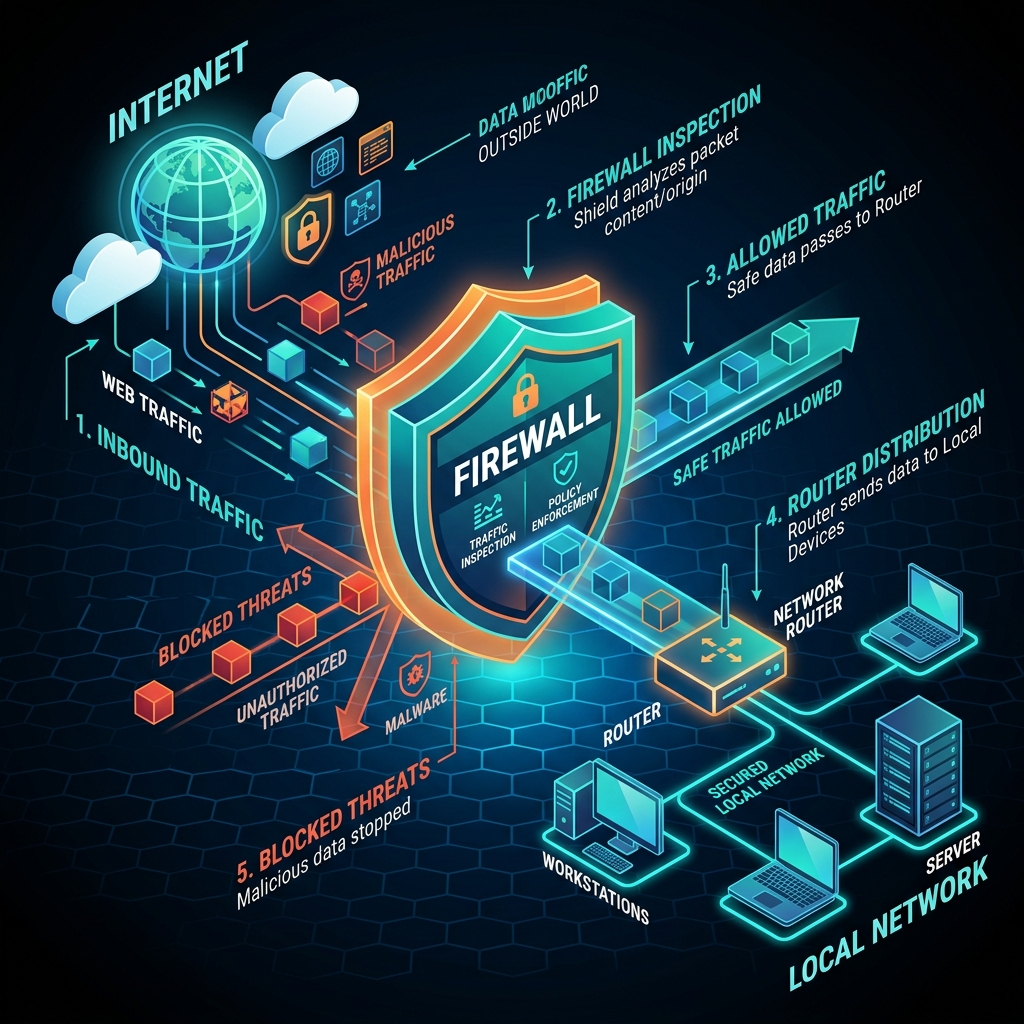
What Is a Firewall?
A firewall is a network security system that monitors, filters, and controls incoming and outgoing network traffic based on predetermined security rules.
It acts as a digital barrier between a trusted internal network (such as your home Wi-Fi or corporate network) and an untrusted external network (such as the public Internet). Its primary objective is to block malicious traffic—such as unauthorized connection attempts, malware probes, and cyberattacks—while allowing legitimate communications to pass freely.
Think of a firewall as a vigilant security guard stationed at the entrance of a building, verifying the credentials of everyone trying to enter or leave.
🔐 Check Open Ports on Your Firewall
Is your firewall properly blocking external connection requests or allowing specific server ports through? Test your public IP for open ports:
Run Free Port Checker →How Does a Firewall Work?
Whenever data travels across the Internet, it is broken down into small units called data packets. Each packet carries critical metadata, including:
- Source IP Address: Where the packet originated.
- Destination IP Address: Where the packet is heading.
- Port Number & Protocol: The specific network service requested (e.g., Port 80/443 for web traffic, Port 22 for SSH, Port 25565 for Minecraft).
- Packet Payload: The actual data content being transmitted.
A firewall inspects these packet attributes against a set of predefined access control rules (Access Control Lists - ACLs). Depending on the rules, the firewall will execute one of three actions:
- Allow (Accept): Permits the packet to reach its destination.
- Block (Drop): Silently ignores and drops the packet without responding to the sender (making the port appear stealthy).
- Reject: Drops the packet but sends an explicit error message (such as an ICMP unreachable reply) back to the sender.
Hardware Firewalls vs Software Firewalls
Firewalls are deployed as either physical hardware devices or software applications, and most secure networks utilize both in tandem.
| Feature | Hardware Firewall | Software Firewall |
|---|---|---|
| Deployment | Physical appliance located between modem and network (or built into Wi-Fi router) | Software application installed directly on an individual operating system (e.g., Windows Defender Firewall, UFW, iptables) |
| Protection Scope | Protects all devices connected to the local network | Protects only the single host device where it is installed |
| Outbound Inspection | Usually basic per-device rules | Advanced per-application control (can block specific local apps from connecting out) |
| Resource Usage | Runs on dedicated hardware CPU/memory | Shares host system RAM and CPU resources |
Main Types of Firewall Technologies
Firewalls have evolved significantly over the past decades. Modern firewalls are categorized by how deeply they inspect network traffic:
1. Packet-Filtering Firewalls
The oldest and simplest type. Inspects individual packets independently by checking header information (IP address, port number, protocol). It does not track whether a packet is part of an established connection session.
2. Stateful Inspection Firewalls
Tracks the state of active network connections (TCP sessions, UDP state tables). It recognizes whether an incoming packet is an expected response to an outbound request made by a local device, automatically allowing valid response packets while blocking unsolicited inbound connections.
3. Proxy / Application-Level Firewalls
Operates at the Application Layer (Layer 7 of the OSI model). It intercepts traffic between client and server, examining full application payloads (such as HTTP requests) to block malicious web scripts, SQL injections, or unapproved protocols.
4. Next-Generation Firewalls (NGFW)
Combines traditional stateful inspection with advanced threat intelligence, Deep Packet Inspection (DPI), Intrusion Prevention Systems (IPS), malware scanning, and encrypted HTTPS traffic inspection.
Inbound Rules vs Outbound Rules & Ports
Firewall policies distinguish between traffic direction:
- Inbound Rules: Control traffic originating from the Internet trying to reach your local machine. By default, consumer firewalls block almost all unsolicited inbound traffic to keep devices secure.
- Outbound Rules: Control traffic originating from your device heading out to the Internet. Most home firewalls allow all outbound connections by default so you can browse websites, play games, and stream video freely.
When hosting a web server, game server, or self-hosted application, you must explicitly configure your firewall to allow connections on specific port numbers. For more details on common port assignments, see our reference guide on Common Network Ports Explained.
Firewall vs Port Forwarding
People often confuse firewalls with port forwarding. While related, they serve opposite purposes:
- Firewall: A security barrier designed to block unauthorized network traffic.
- Port Forwarding: A NAT configuration rule on your router designed to open a pathway and redirect incoming traffic on a specific port directly to a internal device.
If you set up port forwarding on your router but forget to allow the port in your operating system's software firewall, external connections will still be blocked. Read our full guide on Firewall vs Port Forwarding to troubleshoot connection issues.
Firewall vs VPN: Do You Need Both?
A firewall and a VPN (Virtual Private Network) are complementary security tools that address different aspects of online safety:
- A Firewall protects the boundaries of your device or network by blocking unwanted incoming connections and controlling application access. However, a firewall does not encrypt data sent across the public Internet.
- A VPN creates an encrypted tunnel between your device and a remote server, hiding your real public IP address and shielding your Internet traffic from ISP surveillance, hackers on public Wi-Fi, and network eavesdropping.
🔐 Combine Firewall Security with a Zero-Logs VPN
While your local firewall prevents unauthorized hackers from probing your device ports, it cannot stop your ISP or public Wi-Fi operators from tracking the websites you visit or intercepting unencrypted data.
Using a privacy-focused VPN alongside an active firewall ensures complete protection: your firewall guards your local device perimeter, while the VPN encrypts all data in transit across the Internet.
Learn Why and When to Use a VPN →FAQ: What Is a Firewall?
Does Windows come with a built-in firewall?
Yes. Microsoft Windows includes Windows Defender Firewall enabled by default. macOS and Linux systems also feature built-in firewall utilities (such as Application Firewall on macOS, or UFW/iptables/nftables on Linux).
Does a firewall protect against viruses and malware?
Not entirely. A firewall controls network connections and packet traffic. While it can prevent hackers from accessing open ports or stop malware from communicating with remote C2 (command and control) servers, it does not scan email attachments or downloaded files for viruses. You still need antivirus software and safe browsing habits.
Why is my server port reported as closed or stealth?
A port appears closed or stealth when either your software firewall, router hardware firewall, or ISP is actively dropping incoming connections on that port number. For troubleshooting steps, read Why Is My Port Closed?.
Can a firewall slow down internet speeds?
Modern software and hardware firewalls process packets in microseconds, causing virtually zero noticeable latency or speed impact under normal conditions. Only extremely heavy deep packet inspection (DPI) on low-end hardware might cause minor overhead.
Final Takeaway
A firewall is a non-negotiable security layer for every computer, smartphone, and home network. By monitoring data packets and enforcing strict inbound and outbound rules, firewalls keep unauthorized intruders at bay while preserving smooth network connectivity.
🔐 Check Open Ports → 🛡️ Learn Why Use a VPN → 🌍 Check My IP Location →