Introduction
One of the most common questions people ask before installing a Virtual Private Network (VPN) is: "Will a VPN slow down my internet connection?"
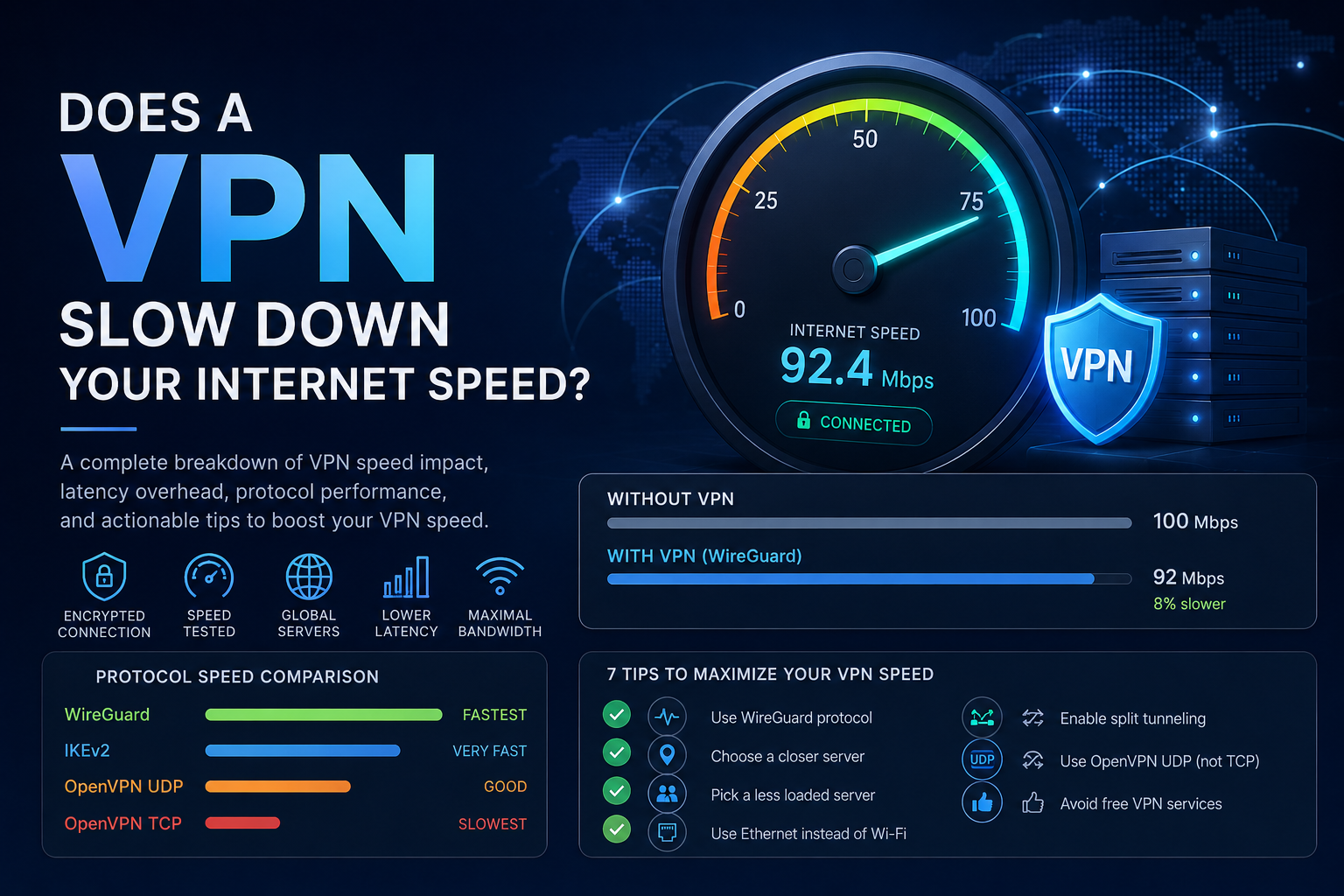
The short answer is: yes, connecting to a VPN will usually reduce your internet speed slightly (typically by 5% to 15%). Because a VPN encrypts your traffic and routes it through an intermediary server, adding an extra hop and mathematical overhead to every data packet is unavoidable.
However, with modern VPN protocols like WireGuard and high-speed 10 Gbps servers, the speed loss on a quality VPN is so minor that most users cannot perceive any difference during web browsing, 4K streaming, or downloading. Furthermore, in specific situations where your Internet Service Provider (ISP) actively throttles your connection, a VPN can actually increase your internet speed.
In this guide, we break down why VPNs affect network speed, how much speed reduction is normal, when a VPN can bypass ISP throttling, and 7 proven steps to maximize your VPN speed.
Why Does a VPN Affect Internet Speed? (The 5 Main Causes)
Five technical factors determine how much speed loss you experience when connected to a VPN:
1. Server Distance and Latency (Ping)
Data packets travel at the speed of light through fiber-optic cables. If you live in New York and connect to a local New York VPN server, your data travels a short physical distance. However, if you connect to a VPN server in Japan or Australia, your data packets must cross thousands of miles of physical cables, increasing latency (ping time) and reducing download throughput.
2. Cryptographic Encryption Overhead
A VPN encrypts every outgoing packet and decrypts every incoming packet using strong algorithms (such as AES-256 or ChaCha20). This encryption process adds extra metadata bytes to every packet (increasing packet size) and consumes processing power on your device and the VPN server.
3. Server Load and Bandwidth Capacity
A VPN server has finite CPU and network bandwidth capacity. If thousands of users connect simultaneously to a single server, bandwidth gets divided among them, leading to slower speeds. Free VPN services suffer heavily from server overcrowding, whereas premium providers allocate high-capacity 10 Gbps servers to prevent congestion.
4. VPN Protocol Efficiency (WireGuard vs OpenVPN)
The VPN protocol defines how encryption keys and tunnels are established. Legacy protocols like OpenVPN (especially OpenVPN TCP) contain heavy codebases that generate higher latency. Modern protocols like WireGuard feature lightweight code (under 4,000 lines), multithreaded CPU processing, and significantly faster throughput.
5. Your Baseline Internet Speed
If you have a 50 Mbps baseline connection, a 10% speed drop to 45 Mbps will be imperceptible. However, if you have a 1 Gbps (1,000 Mbps) fiber line, your device CPU or VPN server port limit may cap out around 400–700 Mbps, making the percentage drop appear higher even though overall performance remains blazingly fast.
How Much Speed Loss Is Normal?
Depending on your VPN setup, here is what you should expect when testing your connection speed:
| Performance Level | Typical Speed Loss | VPN Setup Conditions |
|---|---|---|
| Excellent | 5% – 10% drop | Nearby server, WireGuard protocol, premium 10 Gbps infrastructure. |
| Good | 10% – 25% drop | Regional server (same continent), OpenVPN UDP or IKEv2 protocol. |
| Moderate | 25% – 45% drop | Transcontinental server (e.g. US to Europe), peak traffic hours. |
| Poor | > 50% drop | Overcrowded free VPN, legacy OpenVPN TCP, distant server location. |
Can a VPN Ever Increase Your Internet Speed?
While counterintuitive, there are two distinct scenarios where using a VPN will actually make your internet connection faster:
1. Bypassing ISP Bandwidth Throttling
Many ISPs use Deep Packet Inspection (DPI) to monitor your traffic type. When they detect high-bandwidth activities like 4K video streaming (Netflix, YouTube), P2P torrenting, or online gaming, they intentionally throttle (slow down) your connection to save network capacity.
Because a VPN encrypts all your traffic into an unreadable data stream, your ISP can no longer see what you are doing online. As a result, your ISP cannot trigger content-based throttling rules, restoring your full subscription speed.
2. Fixing Inefficient ISP Routing (BGP Optimization)
ISPs do not always route traffic along the shortest physical path. Sometimes an ISP routes your traffic through congested peering points to save transit costs. Premium VPN providers use high-grade tier-1 network backbones that can provide a more direct network route to destination servers, reducing latency.
🛡️ VPN Selection
Not all VPNs are built equal. Premium privacy-focused VPNs (such as Proton VPN) combine 10 Gbps server backbones, proprietary VPN Accelerator tech, and audited zero-log policies to deliver maximum speed alongside top-tier security.
Explore Recommended High-Speed VPNs →7 Proven Tips to Fix Slow VPN Speeds
If your VPN is slowing down your connection more than expected, apply these troubleshooting steps:
- Switch to WireGuard: Open your VPN app settings and change the connection protocol from OpenVPN to WireGuard (or IKEv2). WireGuard is drastically faster and lighter on CPU resources.
- Select a Closer Server: Choose the nearest server location geographically. If you live in France, connect to Paris or Frankfurt rather than New York.
- Choose a Less Loaded Server: Most VPN apps display server load percentages. Switch to a server with under 30% load to avoid crowded nodes.
- Use Ethernet Instead of Wi-Fi: Weak Wi-Fi signals add latency and packet loss. Connecting via an Ethernet cable removes local wireless bottlenecks.
- Enable Split Tunneling: Route high-bandwidth non-sensitive apps (like heavy game downloads) outside the VPN tunnel while keeping sensitive browsing encrypted.
- Toggle OpenVPN UDP (If WireGuard Is Unavailable): If you must use OpenVPN, ensure it is set to UDP mode instead of TCP. UDP is faster because it does not require packet delivery acknowledgments.
- Avoid Free VPN Services: Free VPNs cap speeds, restrict bandwidth, and congest servers to force user upgrades. Premium VPNs invest in high-capacity infrastructure.
Frequently Asked Questions
Does a VPN increase ping in online gaming?
In most cases, yes. A VPN adds extra routing distance, which slightly increases ping (latency) by 5–20 ms. However, if your ISP has poor routing to game servers, a VPN with optimized server routes can occasionally lower your ping.
Why is my VPN fast on my phone but slow on my PC?
This is usually caused by outdated VPN software, background antivirus network scanning, or different protocol selections between devices. Ensure your PC app is set to WireGuard and disable third-party antivirus network inspection filters.
How can I check if my VPN is leaking my real IP address?
Visit our VPN Check and IP Location Lookup tools while connected. Your visible location should display the VPN server IP, not your home ISP address.
Conclusion
While a VPN introduces a minor, natural overhead due to encryption and server routing, a high-quality VPN running modern protocols like WireGuard will deliver fast, seamless speeds for 4K streaming, gaming, and downloading.
Test your connection before and after connecting using our Speed Test and Latency Test tools to ensure your privacy protection comes with top-tier performance.