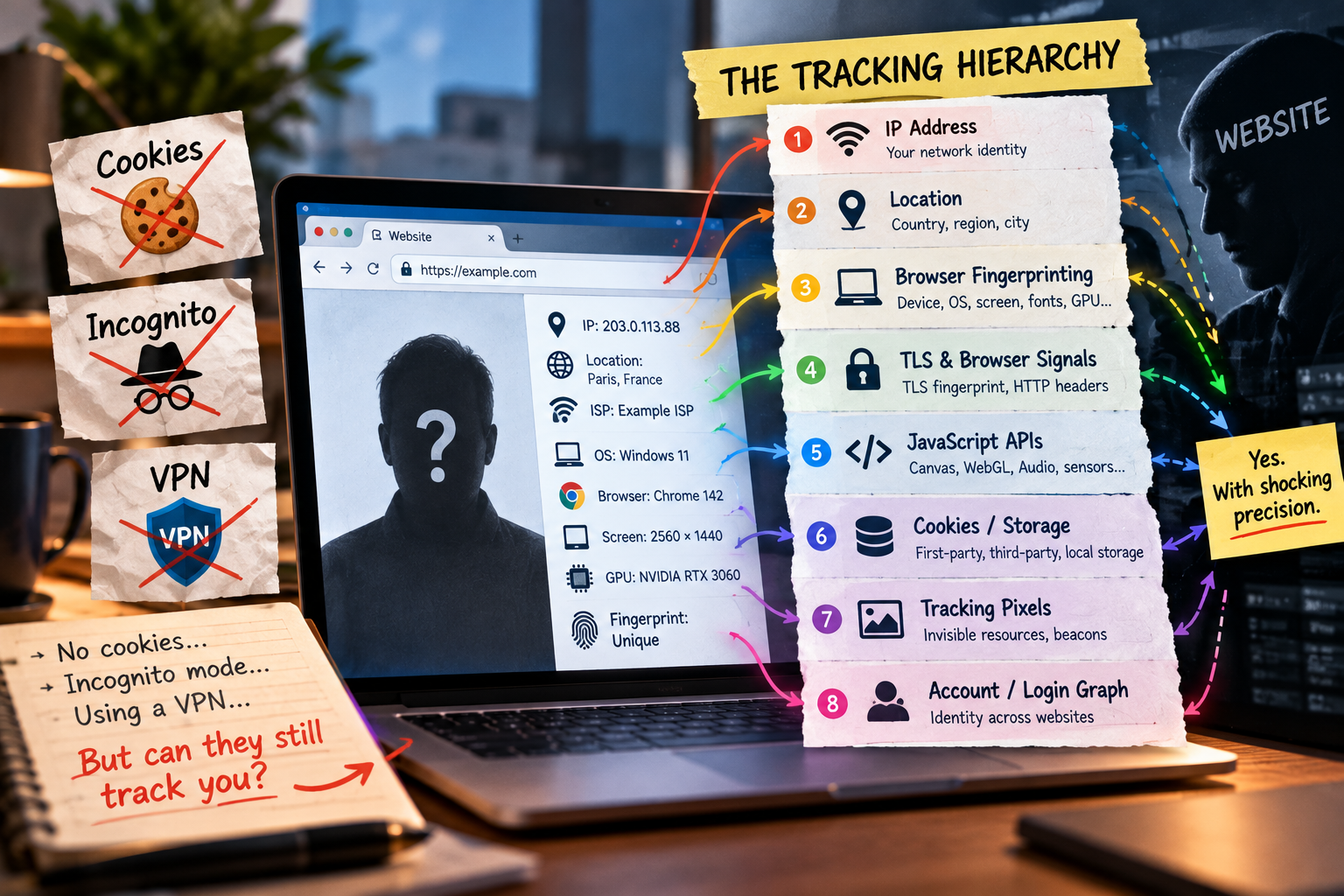
For more than two decades, the internet told privacy-conscious users a simple story: clear your cookies, disable third-party cookies, or open an Incognito window, and your digital slate is wiped clean. Regulators followed suit, mandating the ubiquitous cookie consent banners that clutter modern web navigation.
Believing that story in 2026 is a costly mistake.
You disabled cookies. You are using a VPN. So… can a website still identify you?
The short, unequivocal answer is: Yes, with shocking precision.
Cookies were simply the lowest-hanging fruit of behavioral profiling—a deliberate text file stored on your disk with your consent. When privacy laws tightened and modern browsers began partitioning or blocking third-party storage by default, the global ad tech and fraud detection industry did not stop tracking users. Instead, they moved down the protocol stack to techniques that require zero stored files, zero permissions, and zero user interaction.
To understand how websites recognize you without storing a single cookie, you need to understand the complete 8-layer identification hierarchy:
IP address → Location → Browser fingerprint → TLS/browser signals → JavaScript APIs → Cookies / Storage → Tracking pixels → Account / Login graph
🧪 Test Your Browser Fingerprint Right Now
Curious how unique your setup looks to remote servers right now? Test your Canvas, WebGL, Audio, screen, and system entropy in real time:
Run Live Browser Fingerprint Test →Layer 1: IP Address (The Network Foundation)
Before your browser parses a single line of HTML or executes any JavaScript, it must transmit TCP/IP packets to the web server hosting the site. Every packet header contains your source IP address.
Your public IP address identifies your connection endpoint on the global internet. If you connect directly without protection, your ISP assigns an IP address that remains static or stable for weeks at a time. Tracking scripts record this address on every HTTP request, allowing them to cluster all browsing sessions originating from your household into a shared activity bucket.
Even if you restart your router or your ISP rotates your dynamic IP, your subnet prefix (e.g., /24 or /64 in IPv6) often stays identical, maintaining continuity for behavioral algorithms.
Layer 2: IP-Based Geolocation and Network Metadata
An IP address is not merely a string of numbers—it is an index key linked to extensive commercial intelligence databases such as MaxMind GeoIP, IP2Location, and Spur Intelligence.
When a website receives your IP, it immediately queries these databases to extract:
- Geographic Location: Country, state/region, city, metro code, postal code, and estimated latitude/longitude coordinates. You can check yours instantly on our IP Location Checker.
- Autonomous System Number (ASN) & ISP: The telecommunications carrier managing your connection (e.g., Comcast, Deutsche Telekom, Orange, AT&T).
- Connection Type: Whether the connection is residential broadband, 5G/4G cellular, corporate enterprise, or datacenter hosting.
- Threat and Proxy Scores: Whether the IP is associated with commercial VPN exits, Tor nodes, residential proxies, or botnet activity.
Even without knowing your name, combining your city, specific ISP, and network connection type eliminates over 99% of global internet users.
Layer 3: Browser Fingerprinting (Hardware & Environment Entropy)
This is where cookieless tracking becomes devastatingly effective. Browser fingerprinting is a stateless identification technique that collects dozens of subtle, hardware-dependent configurations exposed by your web browser. When combined, these data points produce an entropy score so unique that your browser can be distinguished among millions of other devices.
Unlike cookies, a browser fingerprint is never written to your hard drive. The website computes it on the fly every time you load a page.
| Fingerprinting Vector | How It Operates | Tracking Uniqueness |
|---|---|---|
| HTML5 Canvas Fingerprinting | Draws a hidden 2D graphic and text string. Subtle differences in GPU silicon, display drivers, and sub-pixel antialiasing produce unique image binary hashes. | 🔥 Extremely High (Distinguishes identical computer models) |
| WebGL & GPU Rendering | Queries OpenGL extensions and renders 3D gradient geometry to extract the exact GPU model and driver version. | 🔥 Extremely High |
| AudioContext Fingerprinting | Processes an inaudible audio frequency buffer through the Web Audio API. DAC hardware nuances alter the waveform output. | ⚡ High |
| System Font Enumeration | Measures text element pixel dimensions across hundreds of font families to detect locally installed software suites (Adobe, Microsoft Office, AutoCAD). | ⚡ High |
| Hardware & Screen Metrics | Extracts CPU logical core count (navigator.hardwareConcurrency), device RAM, screen resolution, color depth, and pixel ratio. |
Moderate (Used for clustering) |
According to landmark research from the Electronic Frontier Foundation (EFF), over 83% of desktop browsers produce a globally unique fingerprint. If you use a customized operating system, multiple monitors, or specialized desktop applications with custom fonts, your browser fingerprint is as distinct as a physical signature.
Layer 4: TLS Handshake & Low-Level Browser Signals (JA3 / JA4)
Even if you disable JavaScript completely to defeat Canvas and Audio fingerprinting, modern surveillance networks can still identify your device at the transport layer using TLS Fingerprinting (JA3 / JA4).
When your browser opens a secure HTTPS connection to a server, it sends an unencrypted Client Hello packet. This packet declares:
- The exact list and order of supported cryptographic cipher suites
- Supported TLS versions and elliptic curve algorithms
- TLS extensions (such as ALPN, Server Name Indication, and supported point formats)
- HTTP/2 or HTTP/3 transport settings (window sizes, frame header priorities)
Because each browser engine (Blink, Gecko, WebKit) and each underlying operating system's networking stack constructs the Client Hello message in a specific sequence, web servers hash these parameters into a compact string (such as JA3 or JA4 fingerprints). This allows edge networks like Cloudflare and Akamai to identify your operating system and exact browser build before a single byte of web application data is transferred.
Layer 5: JavaScript Device & Environment APIs
When JavaScript is permitted to execute, modern web standards provide websites with an astonishing breadth of environment introspection APIs:
- Navigator Properties:
navigator.language,navigator.languages,navigator.platform, andnavigator.userAgentData. - Timezone & Clock Drift:
Intl.DateTimeFormat().resolvedOptions().timeZoneexposes your configured timezone. High-precision performance clocks (performance.now()) can even measure microsecond clock drift variations across physical CPU crystals. - Battery API: Historical versions exposed battery level and charging time down to decimal percentages, providing a temporary cross-origin device token.
- Media Devices Enumeration:
navigator.mediaDevices.enumerateDevices()reveals the quantity and types of connected webcams, microphones, and audio output sinks. - Network Information API: Discloses connection speed estimates, round-trip latency (RTT), and effective connection types (4G, Wi-Fi).
Layer 6: State Storage Beyond Cookies (Supercookies & Cache Tracking)
Even when traditional HTTP cookies (Set-Cookie) are blocked, browsers offer dozens of alternative client-side storage mechanisms. Aggressive tracking entities deploy these as supercookies or "evercookies":
- Local Storage & Session Storage: Web Storage APIs (
localStorage) capable of holding up to 5–10 MB of persistent data that survives browser restarts. - IndexedDB & Cache API: Client-side structured databases designed for offline web apps, frequently leveraged to store persistent visitor tokens.
- HTTP ETag Tracking: Web servers assign a unique
ETagheader to a cached resource (like a 1x1 invisible logo). When your browser revisits the site, it sends anIf-None-Matchheader containing that unique token to check if the file changed, effectively transmitting a tracking ID via HTTP caching. - Favicon Caching: Servers redirect visitors through a unique matrix of 32 sub-routes that either serve or omit a favicon. The browser's persistent favicon cache remembers which icons were downloaded, recreating a binary identifier across private sessions.
Layer 7: Tracking Pixels & Server-Side Tagging (CAPI)
When third-party cookies were restricted, ad networks (Meta, Google, TikTok) pivoted to Server-Side Tagging (Conversions API / CAPI) and tracking pixels.
Instead of relying on third-party scripts loaded in your browser to phone home to facebook.com, the website's own backend server logs your interaction. When you purchase an item or submit an email form, the merchant's server cryptographically hashes your data (SHA-256) along with your IP address, user-agent, and timestamp, and dispatches it directly server-to-server to the advertising platform.
Because this transmission occurs entirely between two remote cloud servers, browser ad blockers, content shields, and private windows are powerless to intercept or prevent it.
Layer 8: The Ultimate Identifier — Account Identity Graphs
At the apex of the tracking pyramid is authenticated identity. No amount of network obfuscation, browser spoofing, or cookie blocking can protect you if you log into an account.
The moment you log into Google, Apple, Microsoft, Amazon, Facebook, or a publisher account:
- Every anonymous fingerprint previously compiled by that network is immediately bound to your genuine real-world name, verified telephone number, and payment credentials.
- Cross-device tracking kicks in: the ad network links your smartphone, work laptop, and smart TV into a single identity graph because they have all shared the same home Wi-Fi IP address or signed into the same family account.
- Data brokers purchase offline credit bureau records, store loyalty card purchases, and property records, stitching your browsing activity into an expansive, permanent dossier.
🛡️ Where Does a VPN Fit Into This Picture?
While a VPN cannot prevent a website from computing your browser's canvas hash or recognizing your active account login, it completely severs the link between your traffic and your genuine physical location and ISP. To understand precisely what VPNs protect—and what they don't—read our architectural breakdown:
Why Use a VPN: Security & Privacy Analysis →Summary: How the 8 Layers Compare
| Tracking Layer | What It Reveals | Survives Cookie Clearing? | Defeated By |
|---|---|---|---|
| 1. IP Address | Exact home network endpoint | ✅ Yes | VPN or Tor |
| 2. Location / ISP | City, postal code, carrier ASN | ✅ Yes | VPN or Tor |
| 3. Browser Fingerprint | GPU canvas, WebGL, audio, fonts | ✅ Yes | Tor Browser, Brave (Farbling), Mullvad Browser |
| 4. TLS / JA4 Signals | Client Hello ciphers, OS network stack | ✅ Yes | Standardized browser profiles (Tor/Firefox) |
| 5. JavaScript APIs | Timezone, cores, media devices | ✅ Yes | Disabling JS (NoScript) or hardened anti-fingerprinting |
| 6. Cookies / Storage | Stored session tokens, localStorage | ❌ No (Wiped on clear) | Incognito mode, clearing storage on exit |
| 7. Tracking Pixels / CAPI | Server-side conversion payloads | ✅ Yes | Burner emails, virtual cards, strict data minimization |
| 8. Account Identity | Real name, phone number, credit card | ✅ Yes | Never logging in; pseudo-anonymous profiles |
How to Actually Protect Yourself Against Cookieless Tracking
Because modern tracking operates across multiple independent layers, relying on a single tool—whether it is an ad blocker extension or an incognito window—is insufficient. Comprehensive digital defense requires a layered strategy:
Frequently Asked Questions
Does Incognito or Private Browsing mode stop websites from tracking me?
No. Incognito mode only prevents your browser from saving your history, cookies, and form entries to your local device after you close the window. The websites you visit can still see your IP address, execute fingerprinting scripts, inspect TLS parameters, and track you in real time during that session.
Does disabling JavaScript stop all cookieless tracking?
Disabling JavaScript neutralizes the majority of browser fingerprinting techniques (such as Canvas, WebGL, AudioContext, and font enumeration). However, websites can still identify your connection using your IP address, TLS Client Hello fingerprints (JA3/JA4), HTTP ETag caching, and CSS-based font detection.
Why does adding more privacy extensions sometimes make tracking easier?
Each browser extension you install can alter the DOM, inject custom stylesheets, or modify network request headers. Fingerprinting scripts measure these subtle differences. If you install 10 obscure privacy extensions, you may become the only person on the entire web with that specific configuration, making your browser exceptionally easy to track.
Can websites track me across different browsers on the same computer?
Yes. This is called cross-browser fingerprinting. While software-specific properties like user-agents differ, hardware-bound characteristics—such as your external IP address, GPU architecture, screen resolution, audio hardware stack, and installed system fonts—remain identical whether you open Chrome, Firefox, or Edge.
Read Next
- Test Your Browser Fingerprint: See How Unique Your Device Is
- Why Use a VPN? Privacy, Security and Best Practices
- How to Remove Your Personal Data from Data Brokers Online
- What Is NAT? Network Address Translation & NAT Types Explained
- Best Public DNS Servers (2026): Speed, Security & Privacy Comparison
- Check Your Public IP Address, ISP & Geolocation