Introduction
Port 53 is one of the most critical network ports on the internet. It is the dedicated port used by the Domain Name System (DNS), the fundamental system that translates human-readable domain names (such as myip.casa) into numerical IP addresses (such as 192.0.2.1) that computers use to route traffic.
Because every internet lookup relies on DNS, Port 53 is constantly active on servers, routers, and client devices worldwide. However, exposing Port 53 directly to the public internet without proper access control creates severe security risks, including DNS amplification DDoS attacks, cache poisoning, and DNS privacy leaks.
In this guide, we explore how Port 53 works, the differences between UDP and TCP DNS traffic, the top security threats associated with exposed DNS ports, and how to verify your network exposure.
🧪 Check Your Connection for DNS Leaks
Are your DNS requests leaking outside your VPN tunnel to your ISP's unencrypted servers? Run an instant test to check which DNS resolvers handle your requests.
Run Free DNS Leak Test →UDP vs TCP on Port 53: How Does DNS Traffic Move?
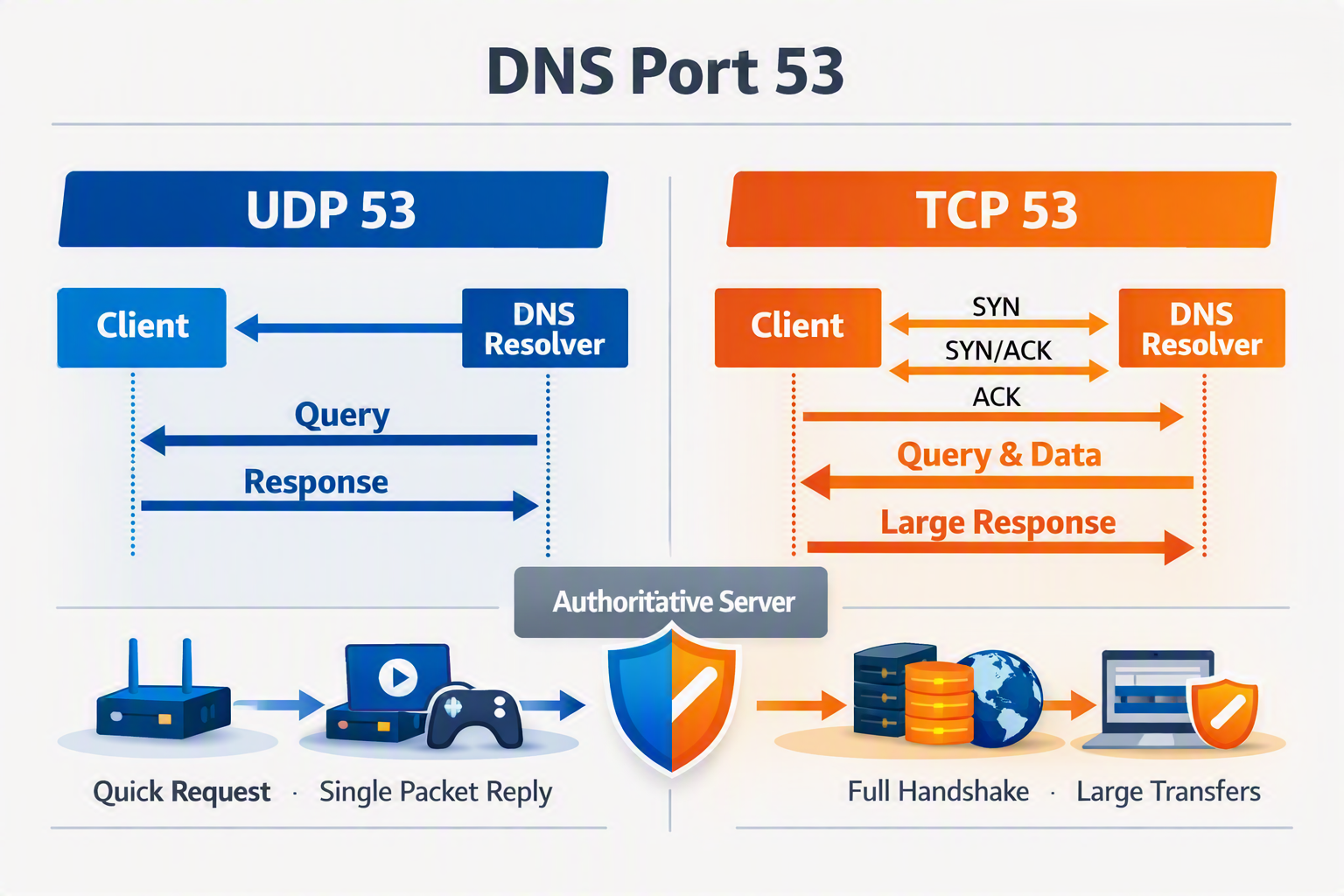
Unlike many network services that rely on a single transport protocol, DNS operates over both UDP (User Datagram Protocol) and TCP (Transmission Control Protocol) on Port 53:
UDP Port 53 (Standard DNS Queries)
Most conventional DNS queries use UDP port 53 because it has low transport overhead. DNS also uses TCP port 53 when needed, including for zone transfers and when a response requires TCP. The traditional 512-byte limit applies to DNS over UDP without EDNS; EDNS allows larger UDP responses to be negotiated.
TCP Port 53 (Zone Transfers & Large Responses)
DNS can use TCP when a response is truncated over UDP or when an operation requires TCP, such as a DNS zone transfer. EDNS allows larger UDP responses than the traditional 512-byte limit, so large DNS responses do not automatically require TCP.
How to Check If Port 53 Is Open
To check whether port 53 is open, you first need to identify where the DNS service is running and whether you want to test it from your local network or from the public internet. A local listening socket and a port accessible from the internet are two different things.
🔍 Check Port 53 From the Internet
Use our external port checker to test whether a service is reachable on your public IP address.
Check Open Ports Now →1. Check Whether a DNS Service Is Running on Linux
On a Linux server, use the following command to list listening TCP and UDP sockets associated with port 53:
sudo ss -lntup | grep ':53 'This command helps identify services bound to port 53. However, a listening socket does not necessarily mean that the service is reachable from the public internet. Firewall rules, routing and the network interface on which the service listens can affect accessibility.
2. Test DNS Queries Over UDP and TCP
DNS uses both UDP and TCP on port 53. You can use dig to test a DNS server you own or are authorized to test:
dig @192.0.2.53 example.com A
dig +tcp @192.0.2.53 example.com A
Replace 192.0.2.53 with the IP address of your DNS server. The first command normally sends a UDP query, while the second explicitly uses TCP.
A successful DNS response confirms that the server answered the query. It does not prove that the server allows unrestricted recursive queries or that it is securely configured.
3. Understand Port Checker Results
- Open: A service appears reachable over the protocol tested.
- Closed: The target appears reachable, but no service is accepting connections on the tested port.
- Filtered or timed out: A firewall, network filter or another condition may be preventing a clear result.
Important: A TCP port check does not establish whether UDP port 53 is reachable. UDP testing requires a method that explicitly supports UDP.
What Traffic Goes Through Port 53?
Port 53 is used by the Domain Name System (DNS) to exchange queries and responses between clients and DNS servers. When you access a website by its domain name, DNS helps resolve that name to an IP address. DNS traffic typically uses UDP, but TCP is also essential for certain operations and responses.
| Port | Protocol | Common Use | Security Considerations |
|---|---|---|---|
| 53 | UDP | Standard DNS queries and responses, commonly used for domain name resolution. | Traditional DNS over UDP is generally unencrypted. Restrict recursive queries to authorized clients and prevent unauthorized open resolvers. |
| 53 | TCP | DNS responses requiring TCP, including truncated UDP responses, and DNS zone transfers between DNS servers. | Restrict zone transfers to authorized secondary servers and ensure that DNS services are accessible only as intended. |
What Does Port 53 Traffic Look Like in Firewall Logs?
In firewall logs, DNS traffic commonly appears as UDP packets sent to destination port 53, followed by responses from the DNS server. TCP connections to port 53 may also appear when DNS uses TCP.
The source and destination IP addresses, ports, protocol and connection status can help administrators identify DNS traffic and investigate unexpected requests. Unusually high query volumes or requests from untrusted external sources may warrant further investigation.
Remember that port 53 traffic is not inherently malicious. DNS queries are a normal part of internet communication, and the security implications depend on which service is exposed, how it is configured and which clients are allowed to use it.
The Top Security Risks of an Exposed Port 53
1. DNS Amplification DDoS Attacks (Open Resolvers)
If a server listens on public Port 53 and accepts recursive queries from anyone on the internet, it is classified as an open resolver. Attackers use botnets to send small spoofed UDP DNS requests to open resolvers with the target's IP address set as the source. The open resolver responds with a massive DNS response (amplified up to 50x in size) directly to the victim, overwhelming their network bandwidth.
2. DNS Cache Poisoning & Spoofing
If an exposed DNS resolver lacks strict transaction ID randomness or source port randomization, attackers can inject forged DNS responses into the server's cache. When legitimate users request a website address, the poisoned server sends them to a malicious phishing site controlled by the attacker.
3. DNS Hijacking & ISP Surveillance
Traditional DNS queries over UDP or TCP port 53 are generally unencrypted. Depending on the network configuration, network operators and internet service providers may be able to observe DNS queries and infer which domain names users are looking up. DNS over HTTPS (DoH) and DNS over TLS (DoT) can encrypt traffic between a client and a compatible resolver.
🛡️ Encrypt Your DNS Traffic with a VPN
A privacy VPN encrypts your entire connection and redirects all DNS queries through an encrypted tunnel to private, zero-log DNS resolvers, preventing ISP surveillance and DNS hijacking.
Learn How a VPN Protects DNS Queries →4. DNS Tunneling and Data Exfiltration
Cybercriminals use DNS tunneling to encapsulate non-DNS protocols (such as SSH or HTTP) inside DNS requests. Because Port 53 is rarely blocked by outbound firewalls, attackers use it to bypass network security controls and exfiltrate stolen data from compromised networks.
🧹 Prevent Profile Correlation & Data Exfiltration
Unencrypted DNS requests and exposed network profiles allow data aggregators to log your digital habits. Discover how data broker removal services help erase personal records from public databases.
Remove Your Personal Data Online →5. Zone Transfer Exposure
If TCP Port 53 is exposed and misconfigured to allow unauthorized DNS zone transfers (AXFR), an external attacker can download your complete domain structure revealing internal hostnames, subdomains, mail servers, and IP mappings.
📁 Protect Files Against Interception
Defending your network against DNS spoofing ensures bad actors cannot redirect your cloud file transfers. Pair network-level security with end-to-end encrypted storage for complete document protection.
Protect Your Files with Encrypted Cloud Storage →Should Port 53 Be Open on Your Router?
For standard residential networks, Port 53 should NEVER be forwarded on your router to the public internet. Your home router acts as a local DNS proxy for devices inside your LAN, but it should never accept inbound DNS requests from external public IP addresses.
Port 53 should only be open to the public internet if you intentionally operate an authoritative public DNS server for your domain names or run a hardened, rate-limited public recursive resolver.
Best Practices to Secure Port 53
- Disable Open Recursion: Configure your DNS server software (BIND, Unbound, PowerDNS) to only answer recursive queries from trusted local subnet IPs.
- Implement Response Rate Limiting (RRL): Mitigate DNS amplification DDoS attacks by limiting packet burst rates for identical queries.
- Disable Zone Transfers (AXFR): Restrict AXFR zone transfer requests exclusively to authorized secondary DNS server IP addresses.
- Adopt Encrypted DNS (DoH / DoT): Migrate internal network resolution to DNS over HTTPS (DoH) or DNS over TLS (DoT) to encrypt DNS traffic between endpoints and resolvers.
Frequently Asked Questions
Does DNS use UDP or TCP Port 53?
DNS uses both. Standard lightweight domain name lookups use UDP Port 53, while large responses (like DNSSEC), zone transfers (AXFR), and fallback requests use TCP Port 53.
What is an open DNS resolver?
An open DNS resolver is a server listening on public Port 53 that resolves recursive DNS queries for anyone on the internet. Because they can be weaponized in amplification DDoS attacks, open resolvers are considered serious security hazards.
How can I check if my browser has a DNS leak?
Visit our DNS Leak Test tool. It will generate unique test subdomains and show you exactly which DNS servers resolve your requests.
How Can I Check If Something Is Running on Port 53?
On Linux, run sudo ss -lntup | grep ':53 ' to identify listening TCP and UDP sockets associated with port 53. To determine whether a service is accessible from the internet, test it from an external network. A locally listening service is not necessarily reachable from outside.
Is Port 53 Secure?
Port 53 is not inherently insecure. However, an exposed DNS service can create risks if it is misconfigured. Restrict recursive queries to authorized clients, control zone transfers and apply appropriate protections against abuse.
Conclusion
Port 53 is the backbone of web navigation, but it demands careful security configuration. Unintentional exposure of Port 53 on public IP addresses leaves networks vulnerable to DDoS weaponization, cache poisoning, and privacy leaks.
Keep Port 53 closed on residential firewalls, restrict open recursion on public servers, and use encrypted DNS tools and VPNs to ensure your browsing activity remains secure and private.