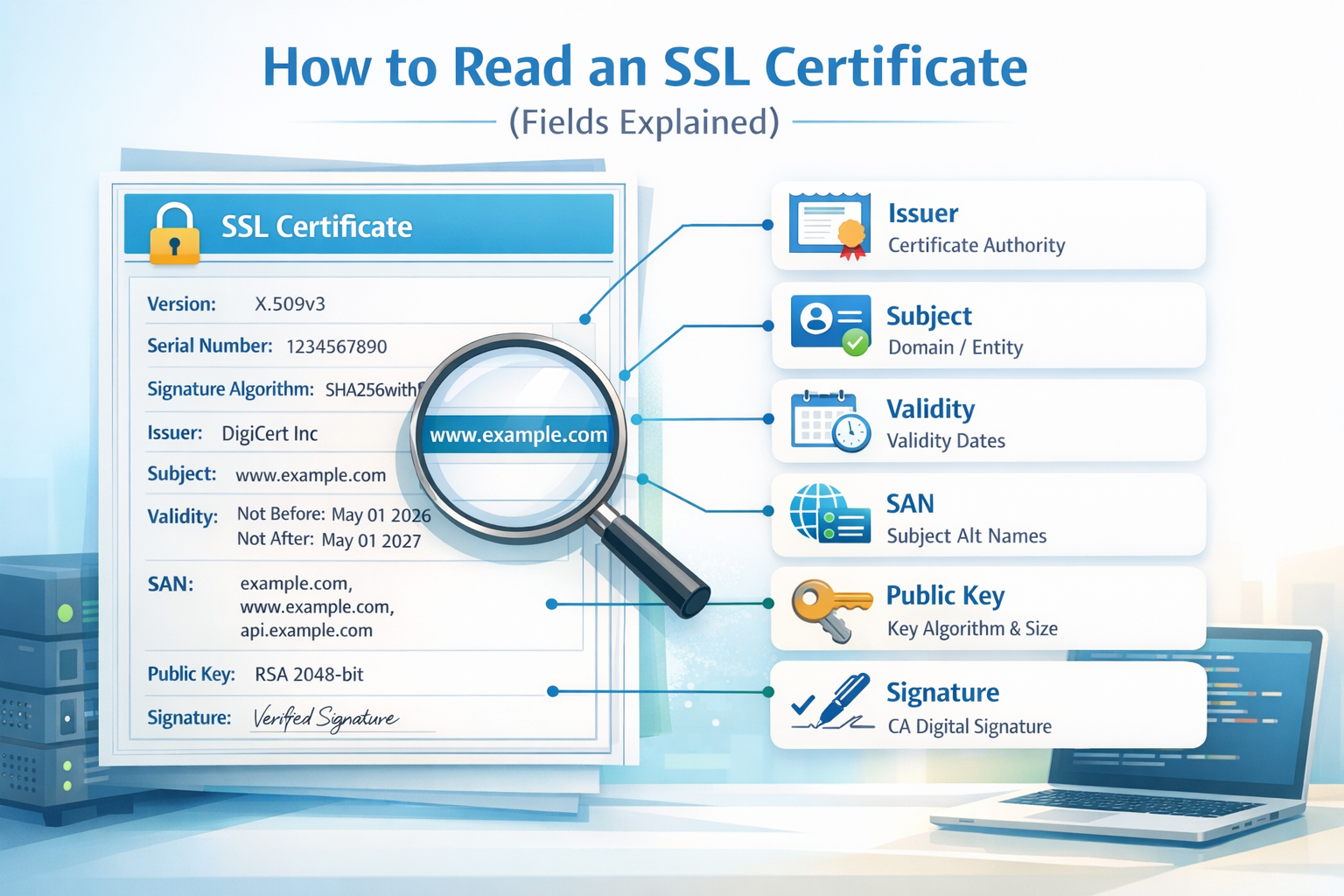
Why Understanding SSL Certificate Fields Matters
An SSL certificate contains critical information used to establish secure HTTPS connections. While browsers abstract most of this complexity, understanding the underlying fields is essential for debugging, security audits, and infrastructure management.
Each certificate follows the X.509 standard, which defines a structured set of fields describing identity, trust, and cryptographic properties.
Quick Way to Read a Certificate
If you don’t want to manually parse certificate data, you can use a decoder tool:
🔐 Decode and Read SSL Certificates Instantly
Paste your certificate and view all fields in a structured format:
Use the Certificate Decoder →Main SSL Certificate Fields Explained
1. Version
Indicates the X.509 version (usually version 3). This defines which extensions are supported.
2. Serial Number
A unique identifier assigned by the Certificate Authority (CA). Used for tracking and revocation.
3. Signature Algorithm
Defines how the certificate is signed (e.g., SHA-256 with RSA). Weak algorithms are considered insecure.
4. Issuer
The Certificate Authority that issued the certificate (e.g., Let’s Encrypt, DigiCert).
5. Validity Period
Defines when the certificate is valid:
- Not Before → start date
- Not After → expiration date
Expired certificates will trigger browser warnings.
6. Subject
The entity the certificate is issued to. For websites, this is typically the domain name.
7. Subject Alternative Name (SAN)
This is one of the most important fields.
It lists all domains covered by the certificate:
- example.com
- www.example.com
- api.example.com
If a domain is not listed here, the certificate will be invalid for that domain.
8. Public Key Information
Contains the public key used for encryption, including:
- Algorithm (RSA, ECDSA)
- Key size (e.g., 2048-bit)
9. Extensions
X.509 v3 certificates include extensions such as:
- Key Usage → defines allowed operations
- Extended Key Usage → server auth, client auth
- Basic Constraints → whether it's a CA
- CRL Distribution Points → revocation info
10. Signature
The cryptographic signature from the issuing CA that ensures the certificate has not been tampered with.
How to Identify Problems in a Certificate
- Expired validity period
- Domain not listed in SAN
- Untrusted issuer
- Weak signature algorithm
- Missing or incorrect extensions
Manual Inspection vs Automated Tools
You can read certificates manually using tools like OpenSSL:
openssl x509 -in certificate.pem -text -nooutHowever, this output can be difficult to parse. A structured decoder simplifies the process significantly.
Key Takeaway
Understanding SSL certificate fields allows you to verify trust, detect configuration errors, and improve security posture.
Whether you are a developer, sysadmin, or security engineer, being able to read a certificate is a fundamental skill in modern web infrastructure.