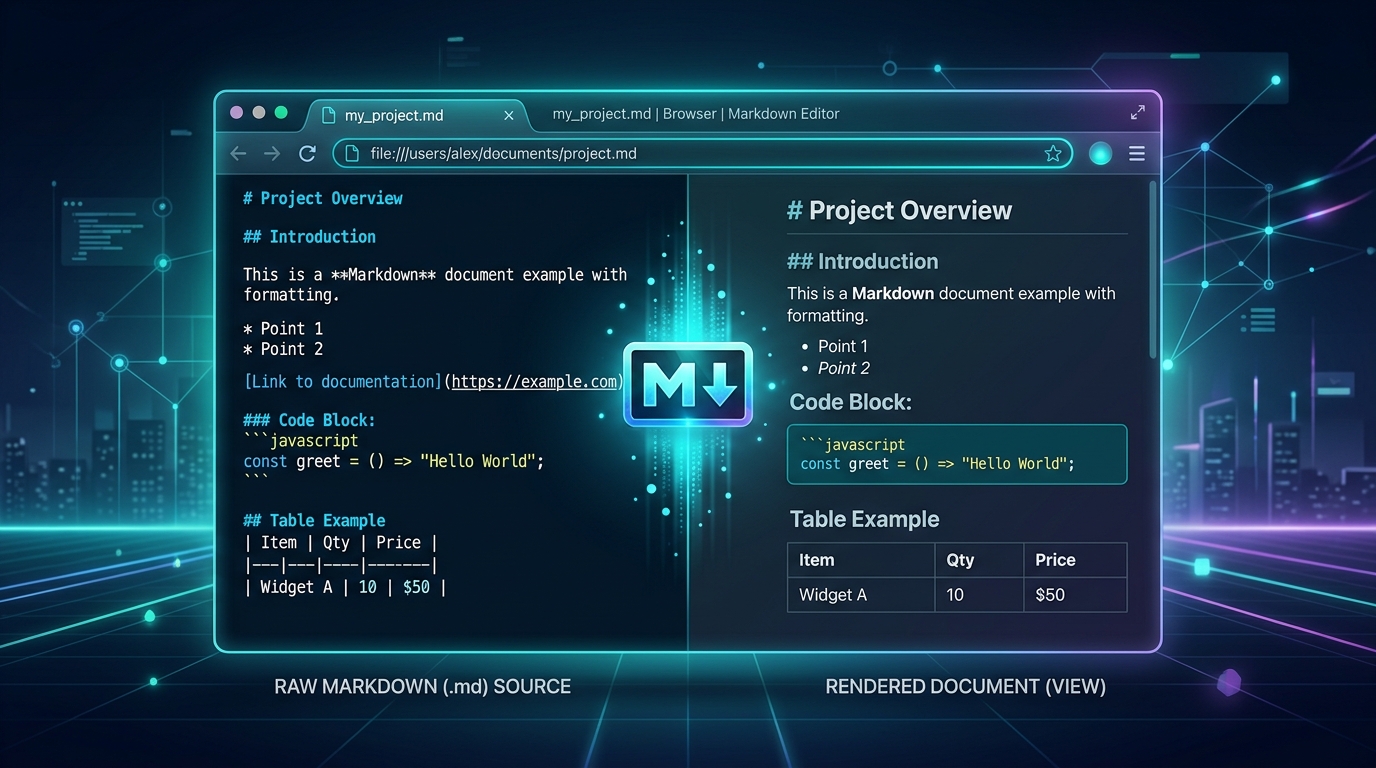
Introduction: What Is a .md File and Why Is It Hard to Read?
If you have ever downloaded an open-source project, exported documentation from tools like Notion or Obsidian, received a technical report, or downloaded an AI conversation log, you have almost certainly encountered a file ending in .md or .markdown.
A .md file is written in Markdown—a lightweight markup language created by John Gruber and Aaron Swartz. Markdown uses plain human-readable characters (such as # for headings, ** for bold text, and - [ ] for task lists) to format text without requiring complex HTML tags.
However, when you double-click a .md file on Windows or macOS, your operating system will typically:
- Ask you "How do you want to open this file?" because no default viewer is assigned.
- Open the file in a raw text editor like Notepad or TextEdit, displaying plain unformatted text cluttered with raw symbols, unrendered tables, and unclickable links.
- Require you to launch heavy code editors like Visual Studio Code or install dedicated desktop markdown viewers.
Fortunately, you don't need to install any software to read Markdown files comfortably. You can open and render any .md file with full rich formatting directly inside your web browser in seconds.
⚡ Open Your Markdown File Right Now
Read any .md file with instant rich rendering, syntax-highlighted code blocks, tables, task lists, and zero data tracking. 100% private and processed locally in your browser:
Why Opening Markdown in a Browser Is the Best Solution
Using a web-based browser viewer offers distinct advantages over traditional desktop software:
- 🚀 Zero Installation: Works instantly on any device—Windows, Mac, Linux, Chromebooks, iPads, and smartphones.
- 🔒 100% Private & Client-Side: High-quality browser viewers render Markdown using local JavaScript engines. Your files and private notes are never uploaded to a remote server.
- 🎨 Full GitHub Flavored Markdown (GFM) Support: Renders complex tables, task checkboxes, code blocks with syntax highlighting, and blockquotes cleanly.
- 💼 Ideal for Restricted Work Environments: If you are on a corporate laptop or school computer without administrator privileges to install software, an in-browser viewer solves the problem immediately.
How to Open a Markdown (.md) File in Your Browser Step-by-Step
Follow these quick steps to read any Markdown document in your browser using the myip.casa Markdown Viewer:
- Open your web browser (Chrome, Firefox, Safari, Edge, or Brave) and navigate to the Markdown Viewer Tool.
- Choose your preferred method to load your file:
- Drag & Drop: Simply drag the
.mdfile from your desktop or folder directly into the viewer window. - File Picker: Click "Open File" or "Choose File" to select the document from your local storage.
- Copy & Paste: If you have raw Markdown copied to your clipboard, paste it straight into the editor panel.
- Drag & Drop: Simply drag the
- The viewer will immediately parse and render the document with clean typography, styled headers, clickable links, formatted code snippets, and readable tables.
- (Optional) Switch between Rendered View, Raw Source, or Split View depending on whether you want to read or edit.
Markdown Syntax Quick Reference: How Raw Code Translates to HTML
Understanding basic Markdown syntax helps you recognize formatting even when looking at raw text. Here is how common Markdown elements are structured and rendered:
| Element | Raw Markdown Syntax | Rendered Result |
|---|---|---|
| Headings | # Heading 1## Heading 2 |
Large bold titles and section dividers |
| Bold & Italic | **Bold** and *Italic* |
Bold and Italic text |
| Links | [myip.casa](https://myip.casa) |
myip.casa |
| Inline Code | `const x = 42;` |
const x = 42; (monospace font) |
| Fenced Code Block | ```python |
Formatted block with language syntax highlighting |
| Task Lists | - [x] Done |
Interactive checklist checkboxes |
| Blockquotes | > Important note |
Indented quote callout box |
| Tables | | Name | Age | |
Structured HTML data grid |
Alternative Ways to Open .md Files on Your Computer
While an online browser viewer is the fastest zero-friction method, here is how other popular options compare:
1. Desktop Code Editors (VS Code, Sublime Text)
If you already have Visual Studio Code installed, open the file and press Ctrl + Shift + V (Windows/Linux) or Cmd + Shift + V (macOS) to open the built-in Markdown preview window. While powerful, launching an entire IDE just to read a simple 2-page document can be overkill.
2. Native OS Preview Shortcuts
- Windows (PowerToys): Installing Microsoft PowerToys enables Peek (Ctrl + Space) and File Explorer preview pane rendering for
.mdfiles. - macOS (Quick Look): Selecting a file and pressing Space opens Quick Look, though full rich Markdown rendering requires third-party plugins like QLMarkdown.
3. Web Browser Extensions
You can install extensions like Markdown Viewer from the Chrome Web Store or Firefox Add-ons. Note that you must enable "Allow access to file URLs" in extension settings so the browser can read local file:/// paths.
Privacy & Security: Why Local Client-Side Rendering Matters
Many Markdown documents contain proprietary source code, internal company documentation, server configuration notes, passwords, or personal journal entries. When choosing a Markdown viewer, security is critical:
🛡️ Zero-Log Local Processing
Unlike many online document converters that upload your files to external cloud servers for processing, the myip.casa Markdown Viewer performs all parsing and rendering directly within your local browser sandbox.
No file contents, metadata, or text snippets are ever transmitted across the network, ensuring complete confidentiality for your private files.
Frequently Asked Questions (FAQ)
Can Google Chrome or Microsoft Edge open .md files natively?
By default, if you drag a .md file into standard Chrome or Edge without extensions, the browser will either display it as raw plain text or download the file again. To view rendered Markdown with formatting and styled tables, use an online tool like the myip.casa Markdown Viewer or a browser extension.
How do I convert a Markdown file to PDF or HTML from the browser?
Once you open your .md file in the online viewer, press Ctrl + P (or Cmd + P on Mac) to open the print dialog. Select "Save as PDF" as your destination printer to generate a clean PDF with all headings, fonts, and images preserved.
Can a Markdown file contain viruses or malicious code?
Markdown files are plain text files and cannot execute malicious binary code on their own. However, because standard Markdown allows raw HTML embedding (such as <script> tags), secure viewers automatically sanitize input to prevent Cross-Site Scripting (XSS).
What is the difference between CommonMark and GitHub Flavored Markdown (GFM)?
CommonMark is the standard baseline specification for Markdown. GitHub Flavored Markdown (GFM) is a popular extension that adds support for tables, strikethrough text, autolinks, and interactive task checklists (- [ ]).
Summary: Open Any Markdown File in Seconds
Reading Markdown files does not require installing bulky desktop software or memorizing terminal commands. With a lightweight browser-based viewer, you can inspect README files, documentation, notes, and technical articles with complete formatting and total privacy.